> For the complete documentation index, see [llms.txt](https://docs.aftermath.finance/llms.txt). Markdown versions of documentation pages are available by appending `.md` to page URLs; this page is available as [Markdown](https://docs.aftermath.finance/perpetuals/tutorials/selecting-a-market.md).
# Selecting a Market
Once you have created and funded an account, you are ready to begin trading. First, choose the market from the dropdown menu.
Account and Market metrics
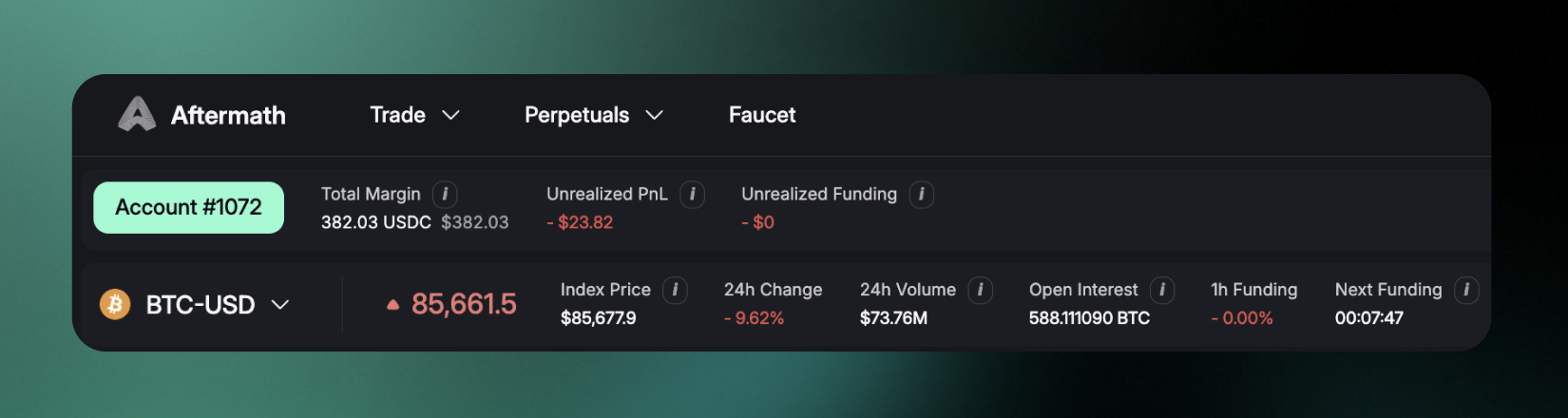
At the top of the screen you will see metrics for your Total Margin, Unrealized PnL (Profit and Loss), and Unrealized Funding. This information allows you to monitor the health of the positions your account currently has open. The information bar below features metrics for the market you have selected. Hovering over item provides a description of each metric. The metrics are, from left to right starting from the Markets drop down menu button:
**Mark Price:** The reference price used for liquidation calculations. It is the median of the book price, funding price, and TWAP price.
**Index Price:** The reference price of the asset, provided through an oracle aggregator. Currently, index prices are obtained from Pyth and Switchboard oracles.
**24h Change:** How much the price of the asset has moved in the past 24 hours.
**24 Hour Volume:** Magnitude of the trading activity in this market over the past 24 hours.
**Open Interest:** Sum of all open order currently open, denominated in the asset being traded in this market.
**1 hr Funding:** The cost as a percentage of the notional size of a position to keep a perpetual contract open over the past hour. If positive, traders holding a long position will make payments to those holding a short position. If negative, short positions pay funding to long positions.
**Next Funding:** Amount of time until the next round of funding payments are settled.
Markets dropdown menu
From the markets dropdown menu, you can view information about each market such as the mark price, funding rate, 24 hour volume, and open interest. You can also sort by asset type: crypto, commodities, and equities.
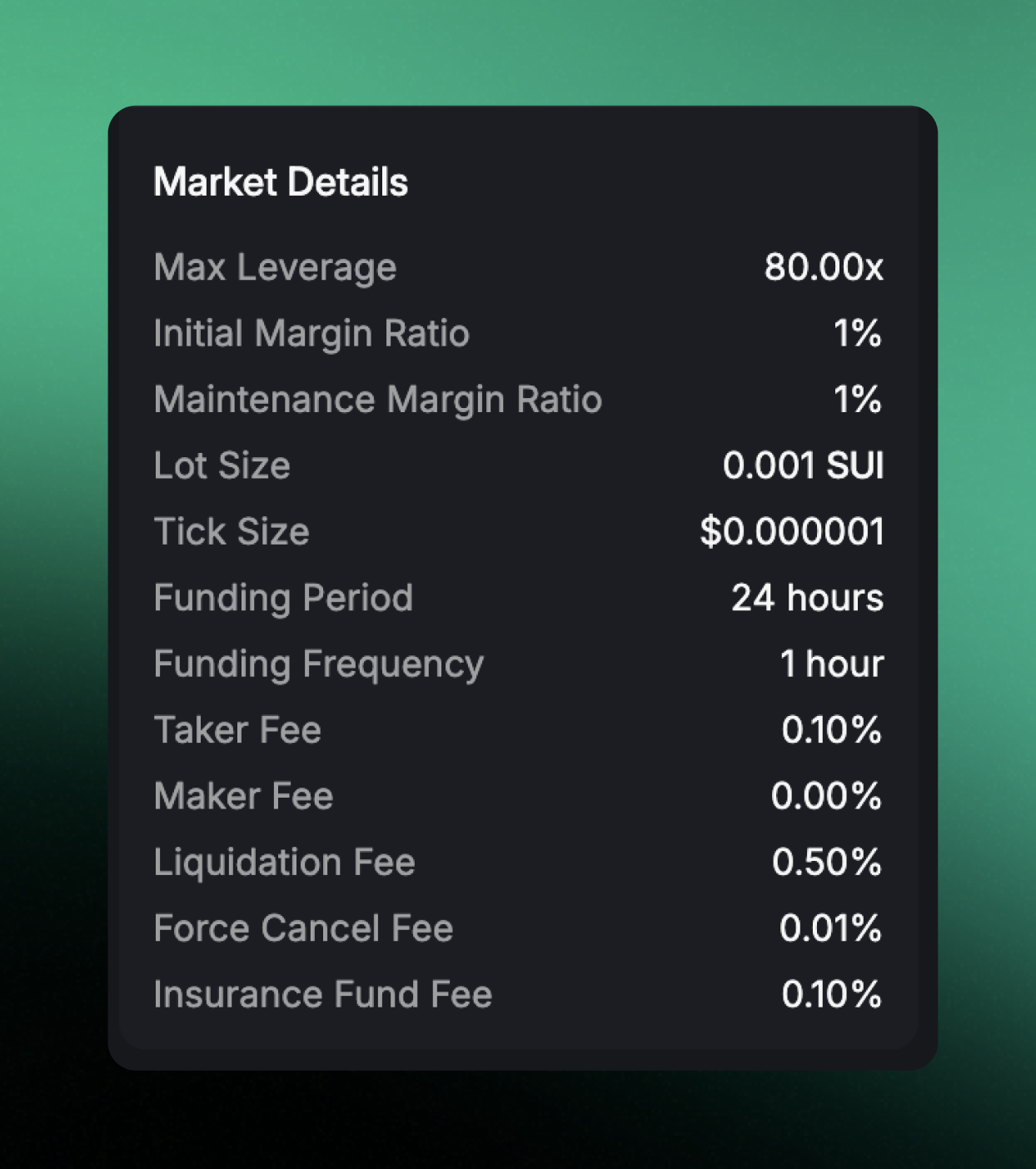
Once you have chosen a market, you can view the Market Details at the bottom right of the screen. This provides information about all of the relevant specifications and fees of that particular market.
Market Details
**Max Leverage, Initial Margin Ratio,** and **Maintenance Margin Ratio** denote the amount of collateral as a percentage of the total notional size of your position required to open and keep open that position.
**Lot Size** and **Tick Size** refer to the size of each price step on the order book, denominated in the market asset and in US dollars respectively.
**Funding Period** is the frequency at which funding payment are paid. **Funding Frequency** is the length of time between updates in the funding rate.
**Taker Fee** is the cost to take liquidity from the order book, i.e. by using a market order
**Maker Fee** is the fee charged if your order provided liquidity to the order book and was taken by another trader
**Liquidation Fee** is the fee charged if your position falls below the Maintenance Margin and must be partially liquidated; this fee is paid to liquidators for performing the service to maintain the health of the market
**Force Cancel Fee** is the fee charged if a limit order must be removed from the order book due to insufficient collateral
**Insurance Fund Fee** is charged every time a liquidation is performed, to build up a reserve which can be drawn upon in cases of bad debt.
Market Details will vary per market based upon its type in order to balance the best trading experience for our users with ensuring the market operates safely and securely. Be sure to review the details for each market so that you can successfully manage your positions in that market.